Cases Overview
Cases are the core of SAR Portal. Each case represents a single Data Subject Access Request (DSAR) from start to finish.
What is a Case?
A case is created when someone exercises their GDPR rights by requesting access to, deletion of, or correction of their personal data. Each case tracks:
- Subject Information: Name, email, phone of the person making the request
- Request Type: The specific GDPR right being exercised
- Timeline: When received, due date, and all activities
- Documents: Files uploaded and processed for the request
- Communications: Messages exchanged with the data subject
- Status: Current state in the workflow
Cases List View
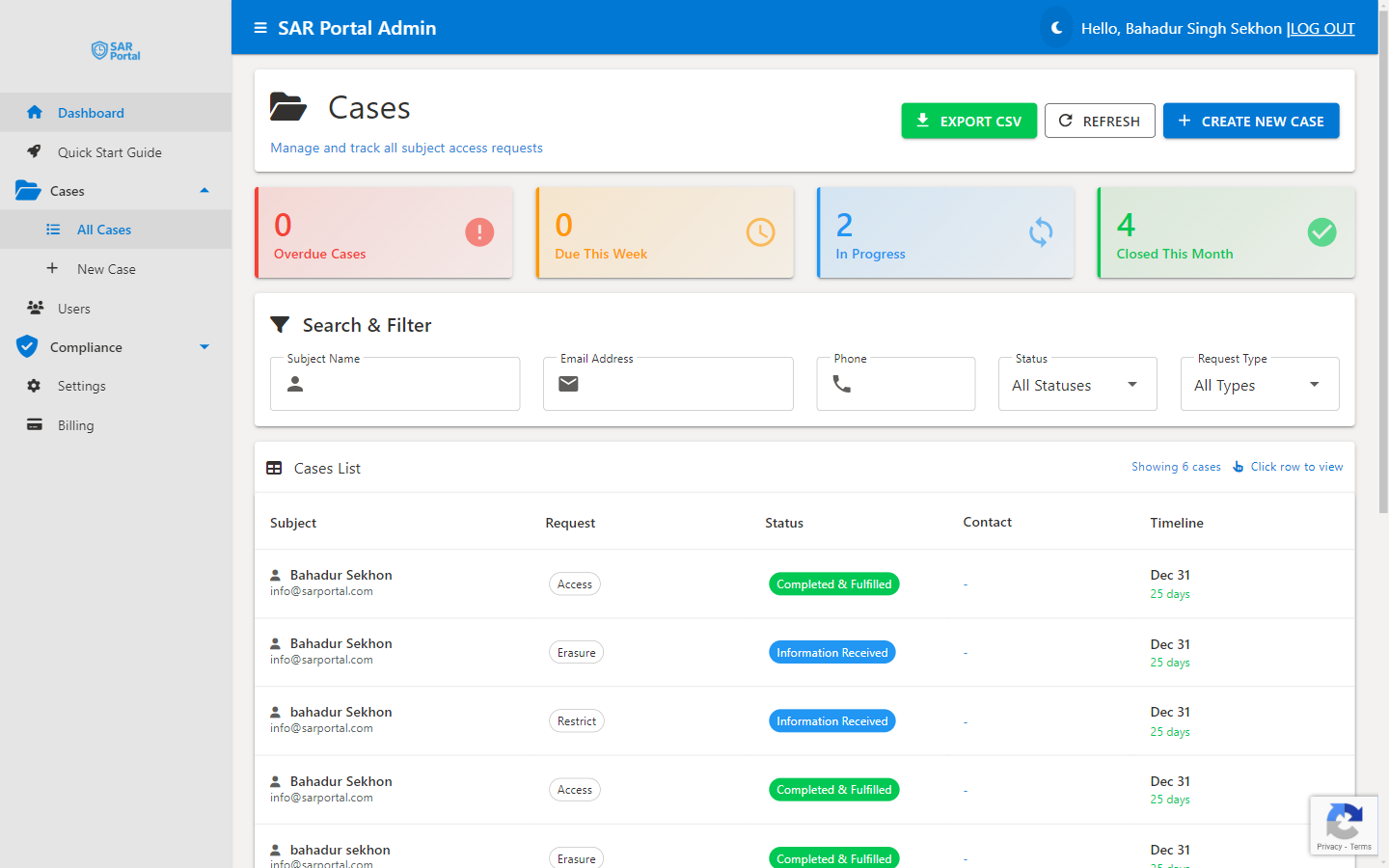
The Cases page shows all requests with key information:
Status Indicators
Color-coded cards at the top show:
- Overdue Cases (Red) - Past the deadline, requires immediate attention
- Due This Week (Yellow) - Approaching deadline
- In Progress (Blue) - Active cases being worked on
- Closed This Month (Green) - Recently completed
Search & Filter
Find cases quickly using:
- Subject name search
- Email address search
- Phone number search
- Status filter
- Request type filter
Case List Columns
| Column | Description |
|---|---|
| Case ID | Unique identifier |
| Subject | Data subject’s name |
| Contact | Email and phone |
| Status | Current workflow status |
| AI Risk | Read-only AI risk level (Low, Medium, High, Critical) |
| Request Type | Access, Erasure, etc. |
| Due Date | Deadline for response |
| Actions | Quick actions menu |
Case Actions
From the cases list, you can:
- View - Open the full case summary
- Export CSV - Download cases for reporting
- Create New Case - Start a manual case
AI Risk Level
Each case can be assessed by AI, which assigns a read-only risk level. This is derived automatically from the case details — you cannot set or change it manually. Use it as guidance, not as a control:
| AI Risk Level | Typically Indicates |
|---|---|
| Low | Standard request, no special circumstances |
| Medium | Needs attention but not urgent |
| High | Complex request or sensitive data involved |
| Critical | Legal involvement, regulator inquiry, or other careful handling required |
Understanding Due Dates
GDPR Article 12 requires response “without undue delay and in any event within one month.” SAR Portal automatically:
- Sets the due date to 30 days from creation
- Shows countdown badges (e.g., “28 days remaining”)
- Highlights overdue cases in red
- Sends reminder notifications as deadlines approach
Extensions of up to 2 additional months are allowed for complex requests.
Next Steps
- Creating Cases - Learn how to create new cases
- Case Statuses - Understand the workflow states
- Case Actions - Available actions for processing
- Identity Verification - One-click Mark Verified and what gets recorded