Integrations
The Integrations section lets you configure your public case portal and connect SAR Portal with other systems.
Public Case Portal
The Public Case Portal allows data subjects to submit and track their SAR requests directly.
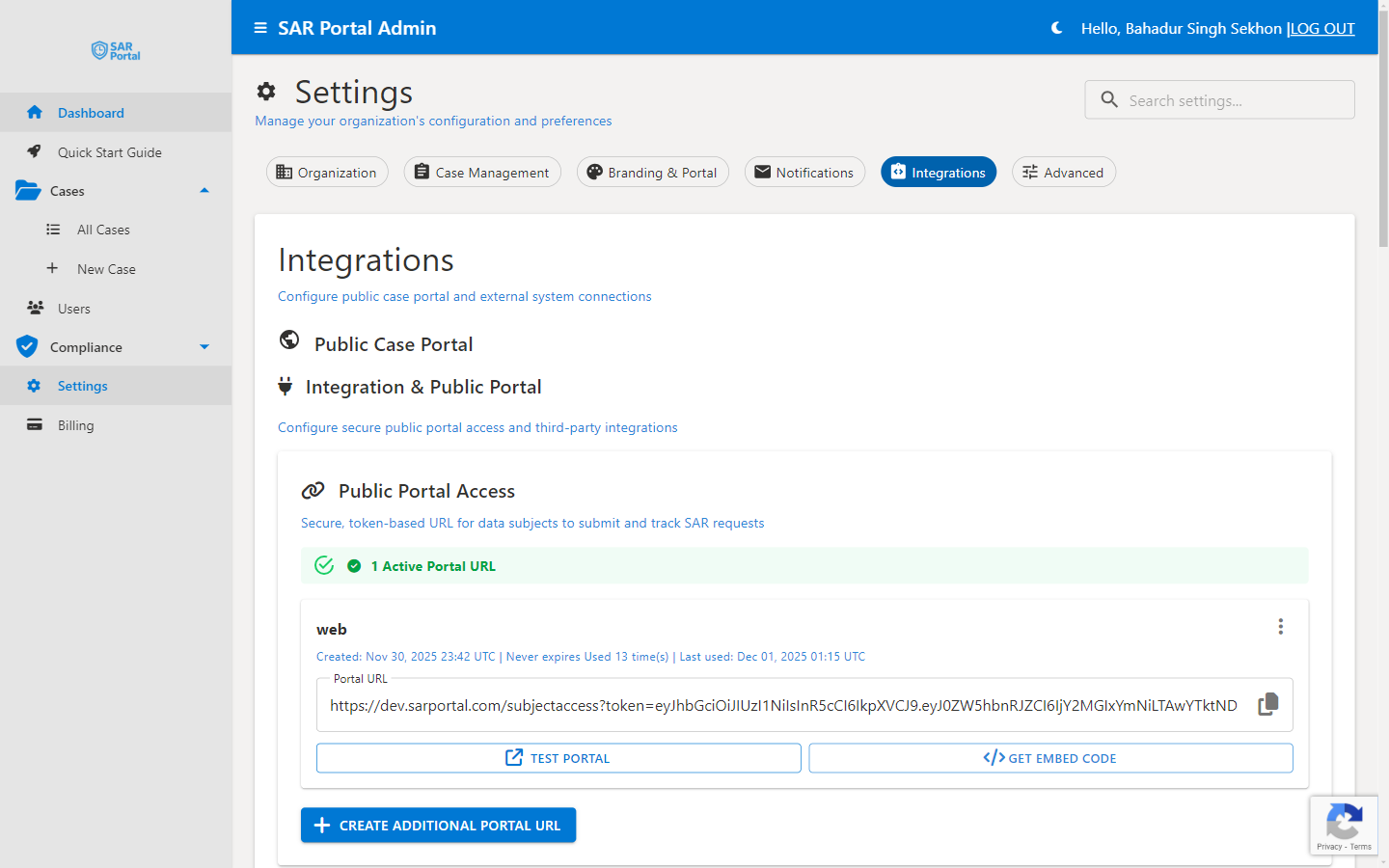
Public Portal Access
Your portal URL is a secure, token-based link that data subjects use to:
- Submit new SAR requests
- Track the status of existing requests
- Provide additional information when requested
The portal submission URL has the format:
https://app.sarportal.com/subjectaccess?token={token}
Managing Portal URLs
- Go to Settings > Integrations
- View your active portal URLs
- Click Test Portal to preview how subjects see it
- Click Get Embed Code to embed the portal on your website
Creating Additional Portal URLs
Click Create Additional Portal URL to generate new URLs with:
- Time-bound access - Set expiration dates for temporary campaigns
- Custom naming - Label URLs for different use cases
- Usage tracking - Monitor how often each URL is used
Portal URL Best Practices
- Add your main portal URL to your privacy policy
- Create time-bound URLs for specific data collection campaigns
- Monitor usage to identify which channels generate most requests
- Disable unused URLs to maintain security
Available Integrations
Current Integrations
| Integration | Status | Plans |
|---|---|---|
| Public Portal | Built-in | All |
| Stripe (Billing) | Built-in | All |
| Email (SMTP) | Built-in | All |
| Email Notifications | Built-in | All |
Planned Integrations
We’re evaluating additional integrations based on customer demand:
- Zapier integration
- Microsoft 365 connectors
- Slack notifications
Email Notifications
SAR Portal sends transactional email notifications automatically for key events such as a new case received via the public portal, case status changes, and team member invitations. These emails are sent automatically based on system events and are not individually toggleable. See Email Templates for details on branding and testing them.
API Access
API access is not currently available. We’re exploring this for a future release based on customer demand. If you have integration requirements, please contact support@sarportal.com to discuss your needs.
Email Integration
Built-in Email
SAR Portal sends emails via secure SMTP:
- Notifications to your team
- Communications to subjects
- System alerts
Custom Email Domain
Enterprise customers can configure custom email domains:
- Send from your domain
- Improved deliverability
- Brand consistency
Contact support for custom domain setup.
Authentication
All SAR Portal users sign in securely via enterprise identity management. Supported sign-in methods:
- Microsoft account (personal or work)
- Google account
No passwords are stored by SAR Portal — authentication is handled by a dedicated identity platform using industry-standard protocols.
Enterprise customers receive assisted configuration for onboarding large teams.
Requesting New Integrations
We’re expanding integration options based on customer demand. To request:
- Contact support@sarportal.com
- Describe your use case
- Specify the system you want to integrate
- We’ll evaluate and respond
Popular requests are prioritized for development.